 KeyBolt
Set Arrival Windows and Check Drive Time
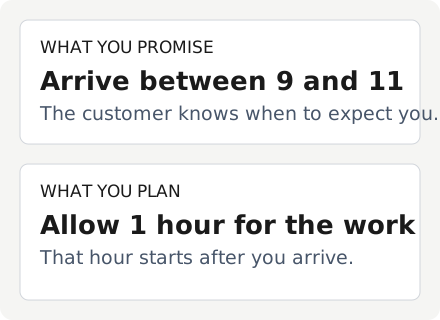
An arrival window is what you promise the customer. The work estimate is how long you expect to be busy after arriving. Set both when scheduling in Dispatch; a two-hour arrival window does not mean a two-hour job.
Pick the Arrival Promise
Use the arrival choices offered by your shop: a specific time, an arrival window, or anytime during the day. Check the date, crew, and expected work length before saving. The customer's confirmation uses the saved arrival details in the shop's time zone.
The job type's Usual length supplies a starting duration on Create Job. A price list supplies prices. See Set Up Your Shop's Job Lists.
Read the Drive Check
Dispatch checks travel from the preceding trip when you book work. Review a warning about too little drive time or overlapping work before confirming. A missing address or unavailable estimate means you should check the route yourself; it does not mean the drive takes zero minutes.
Drive times are estimates. Traffic, parking, loading, and actual work can change the day. For drive estimates, TomTom receives the two map points and planned departure time, not customer names, phone numbers, or notes.
Tell the Customer
Saving a schedule is separate from sending a confirmation. Review and send it from the job when ready. See Send an Appointment Confirmation.
Last reviewed October 12, 2026.
Related articles
Still need help? Contact us and we'll respond within 2 business days.